FlutterFlow AI: Build Apps from Text Prompts in 2026



You have a brilliant app idea but building it feels overwhelming. That gap between concept and working prototype is exactly what FlutterFlow AI was built to close.
FlutterFlow's AI tools have moved well past basic chatbots. You can now describe what you want in plain English and get a production-ready app screen back in seconds. This guide walks through exactly how that works, which AI tools do what, and the full build process from start to deploy.
By the time you finish reading, you will know whether FlutterFlow AI fits your project and how to get the most out of it if it does. We have built dozens of FlutterFlow apps at Third Rock Techkno, and this guide reflects real production experience, not just documentation summaries.
- FlutterFlow AI includes six distinct tools: Prompt to App, Prompt to Page, Prompt to Component, Page Autocomplete, Import from Figma, and AI Agent Builder.
- The free plan gives 100 AI credits. Paid plans range from 500 credits (Standard) to 5,000+ credits per month (Teams).
- FlutterFlow exports real Flutter code, which separates it from most no-code competitors that lock you in.
- AI generation is fastest for standard UI patterns. Complex business logic, custom animations, and regulated data handling still require manual work or custom code.
- Third Rock Techkno has shipped production FlutterFlow apps for clients across retail, healthcare, and logistics. We know where the platform's AI tools shine and where they create rework.
Quick answer: FlutterFlow AI lets you generate app screens, logic, and content from natural-language prompts inside FlutterFlow. It speeds up prototyping and UI building, but complex logic, integrations, and production polish still need a developer. Use it to accelerate—not replace—app development.
What Are FlutterFlow AI Tools and How Do They Actually Work?
FlutterFlow AI is FlutterFlow's built-in suite of artificial intelligence tools that changes how you build mobile and web applications. Instead of starting with blank screens and placing every element manually, you describe what you want and AI generates functional components, complete pages, and entire app structures. To see what the platform produces in practice, take a look at these successful apps built with FlutterFlow that are live in production.
The Core Technology Behind FlutterFlow AI Gen
Think of it as a skilled developer sitting next to you who understands both design principles and Flutter architecture. When you type "create a user profile page with photo, name, bio, and edit button," the AI does not randomly assemble elements. It draws on patterns from millions of real app interfaces and understands Flutter's widget system at a structural level.
The underlying models are trained on UI patterns, user experience conventions, and Flutter's component architecture. This means generated components follow industry standards and proven design patterns rather than producing something that needs heavy correction. Not sure whether to use FlutterFlow or write native Flutter? Read our FlutterFlow vs Flutter comparison to understand when each approach makes sense.
How FlutterFlow AI Integration Actually Works
What separates it from generic AI code generators is depth of integration. When AI generates a component, it appears as fully editable FlutterFlow elements inside the visual editor. You can customize it, hook it up to Firebase or Supabase, add animations, or modify styling without touching a line of code.
The AI understands FlutterFlow's specific widget library, state management patterns, and backend connection points. Generated components work natively within the FlutterFlow environment rather than producing raw Dart that needs extensive cleanup. According to FlutterFlow's official AI page, over 3.3 million users are already building with this system.
Our team at Third Rock Techkno has shipped FlutterFlow AI-powered apps for 50+ clients. Talk to us →
How to Generate an App from a Prompt in FlutterFlow
The Prompt to App feature is FlutterFlow's most powerful AI tool. Here is how to use it from a standing start.
Step 1: Start a New Project
- Log in to FlutterFlow.
- Click "Create New Project".
- Select the "Generate with AI" option.
Step 2: Write a Specific Prompt
Vague prompts produce vague results. Strong prompts include the app purpose, key screens, design style, and target user. Example:
"Create a fitness tracking app with a dashboard showing daily steps, calories burned, and workout history. Include a workout log screen where users can add exercises, and a profile page with settings. Use a modern dark theme with green accent colors."
Good prompt rules:
- Be specific: "Blue button with rounded corners" beats "nice button".
- Include context: Mention your industry or use case.
- Describe screens by name: "Home, menu, cart, checkout, order tracking".
Step 3: Review and Refine
FlutterFlow generates your app structure. You can then:
- Modify individual pages with Prompt to Page.
- Add components with Prompt to Component.
- Connect to Firebase or your backend.
- Export the Flutter code.
The key workflow: use Prompt to App for overall structure, Prompt to Component for individual elements, and Page Autocomplete to fill gaps the AI did not anticipate.
What Makes FlutterFlow AI Apps Different?
The key difference between this platform and other AI development tools is integration depth and output quality.
Native FlutterFlow Integration
When you generate an app from a prompt, you get actual FlutterFlow components with proper widget hierarchies, responsive design principles, and connection points for FlutterFlow's backend services. You can immediately customize AI-generated components using the visual editor, connect them to databases, add animations, or modify styling, all without code.
Production-Ready Output
The build workflow produces components that are genuinely ready for production. The AI understands mobile development best practices, accessibility requirements, and performance optimization, so generated components work well across different devices and screen sizes without significant manual cleanup.
Full Flutter Code Export
Most no-code platforms lock your app inside their ecosystem. FlutterFlow exports real, clean Flutter code at any time. This matters when you outgrow the visual builder, need custom native features, or want to hand the codebase to a Flutter development team for advanced work. FlutterFlow's code export documentation covers what gets exported and what stays inside the platform.
FlutterFlow AI Features in 2026
Each tool serves a different part of the development process. Knowing which tool to reach for first saves significant time.
Image to Component
This feature lets you upload any user interface image, whether a hand-drawn sketch, a screenshot from another app, or a mockup from a design tool, and the platform analyzes the visual structure to create matching components.
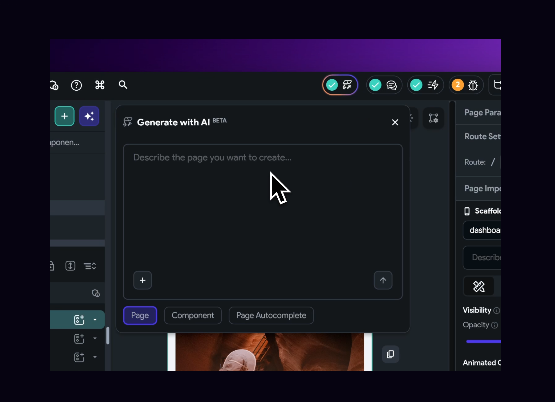
We tested this with a rough wireframe sketch. The AI correctly identified buttons, text fields, and layout containers, then generated functional FlutterFlow widgets matching the design intent. The accuracy is strongest for standard UI patterns like login forms, product cards, and navigation layouts.
Prompt to Component
Describe a component in natural language and AI creates the corresponding FlutterFlow widgets with styling and structure included.
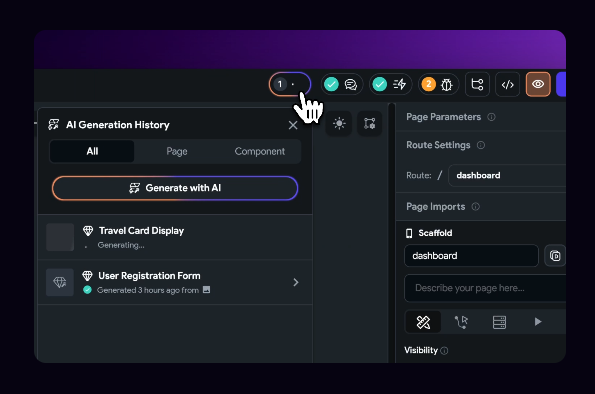
For example, typing "create a product card with image, title, price, and add to cart button" generates a complete component with proper layout, placeholder content, and styling that follows current mobile design conventions. The component includes proper spacing, responsive behavior, and semantic structure out of the box.
Prompt to Page
When you need to generate full app screens quickly, Prompt to Page creates complete page layouts from text descriptions. This goes beyond individual components to generate entire screens with navigation, content areas, and user interaction flows.
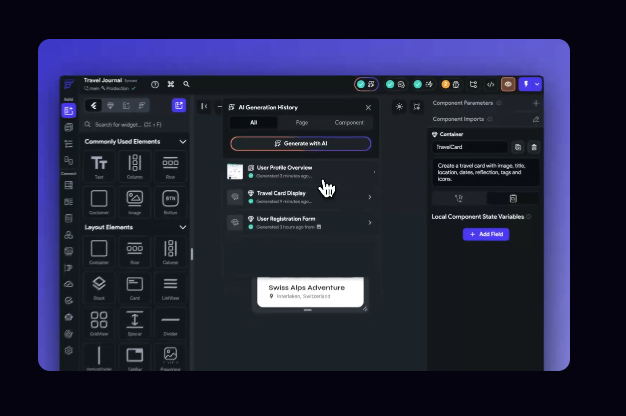
We tested this with "create a restaurant menu page with categories, food items, prices, and ordering functionality." The AI generated a page with category tabs, scrollable item lists, quantity selectors, and a cart summary section, all properly structured and ready for backend connection.
Page Autocomplete
This feature analyzes your existing page structure and suggests additional components that would round out the user experience. It understands app context and user flow requirements, which makes it useful for catching gaps your prompt did not anticipate.
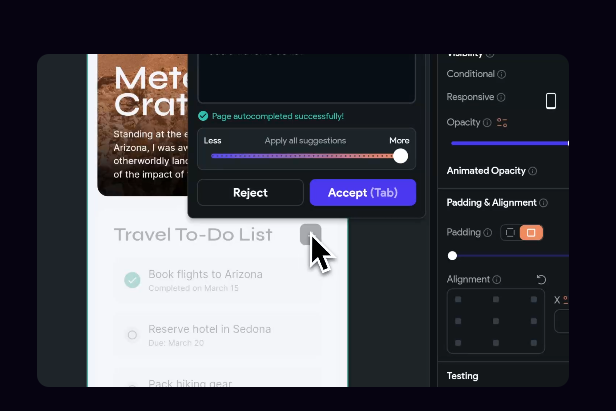
When working on an e-commerce product page, Page Autocomplete suggested related product sections, customer review components, and shipping information areas. Each suggestion was contextually relevant and properly integrated with the existing layout.
Import from Figma
For teams using Figma for design, this AI feature translates Figma designs directly into FlutterFlow components. The AI maps colors from your Figma theme to FlutterFlow themes, imports assets automatically, and creates component structures that match the original design intent.
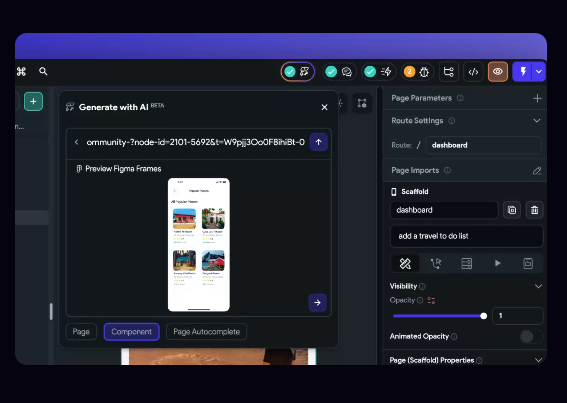
This bridges the design-to-development gap, letting design-led teams work in Figma and then drop finished work into FlutterFlow without manual recreation.
AI Agent Builder
The AI Agent Builder lets you create and deploy custom AI agents directly within your FlutterFlow apps. You can configure chatbots, virtual assistants, or automated response systems that connect directly to your app's data and functionality.
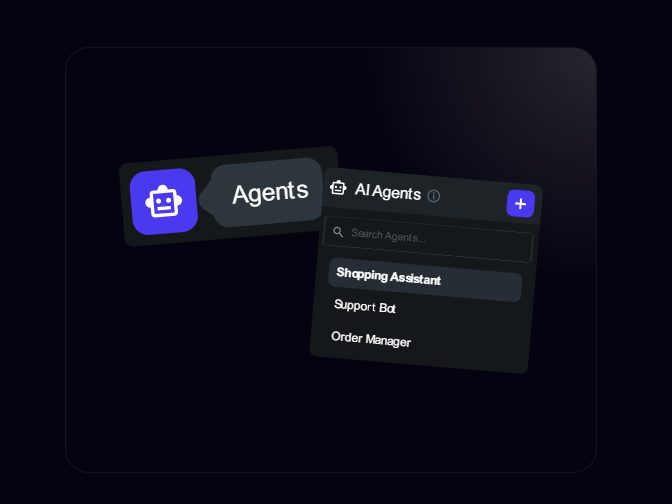
The AI Agent Builder provides templates for common use cases like customer support, lead qualification, and content recommendation, but also allows full customization for specialized business needs. You can connect it to GPT-4, Gemini, or Claude depending on your requirements.
Skip the trial and error. We will walk you through the right tools for your use case. Talk to us →
Step-by-Step Guide: Building an App with FlutterFlow AI
Here is the complete process of creating an AI-powered application using these AI tools, based on how we run production builds at Third Rock Techkno.
Step 1: Sign Up and Create a New Project
You need a FlutterFlow account with access to AI features. Prompt to App capabilities are available on FlutterFlow's paid plans, so confirm you have the right subscription level before starting. The free plan includes 100 AI credits, which is enough to explore the tools.
Create a new project, choose your app name, select target platforms (iOS, Android, Web), and configure basic project settings. Starting with a blank project shows AI generation at its most visible.
Step 2: Design Your App Interface with AI
Start with Prompt to Page to create your main screens. For a fitness app, you might prompt: "Create a fitness dashboard with workout summary, recent activities, progress charts, and quick action buttons."
The AI generates a complete page layout you can then customize. Use the visual editor to adjust colors, spacing, and fonts to match your brand. For additional components, use Prompt to Component to add specific functionality. Each component integrates with your page structure, maintaining consistent design patterns.
Step 3: Add AI Agent Capabilities
This is where your app gains intelligence. Use the AI Agent Builder to add conversational AI, smart recommendations, or automated assistance. Configure your agent based on your app's specific needs. For a fitness app, this might be an AI coach that provides workout recommendations, answers exercise technique questions, or offers motivation.
The AI Agent Builder gives you control over personality, knowledge base, response style, and integration points with your app's data. You can connect it to external AI services like OpenAI or Google AI for more advanced capabilities.
Step 4: Add Backend Services
FlutterFlow AI generates app structures that connect naturally to FlutterFlow's backend capabilities. Connect your app to Firebase, Supabase, or custom backend services to handle user authentication, data storage, and business logic. According to FlutterFlow's backend documentation, Firebase and Supabase integrations are configured visually with no manual SDK setup required.
Step 5: Connect External APIs
Modern AI-powered apps rely on multiple external services. FlutterFlow's API configuration interface handles REST and GraphQL endpoints. For AI-specific integrations, connect to OpenAI for natural language processing, Stability AI for image generation, or Google Cloud AI for advanced analytics. Configure error handling, loading states, and offline behavior during this phase.
Step 6: Test Across Devices
Use FlutterFlow's preview mode to test your app across different devices and screen sizes. Pay particular attention to AI-powered features: verify that AI agents respond appropriately, generated components handle edge cases, and API integrations work under different network conditions. FlutterFlow's debugging tools provide detailed logs that help identify issues with AI components or backend connections.
Step 7: Deploy Your App
Once testing is complete, FlutterFlow handles the technical side of app store submission: code signing, asset optimization, and platform-specific configurations. For web deployment, FlutterFlow generates optimized progressive web apps. Monitor performance after launch and be ready to iterate based on real user behavior.
FlutterFlow AI vs. No-Code Competitors
Bottom line: The platform wins on mobile app output and AI integration depth. The full Flutter code export is the clearest differentiator from every other tool in this list. Bubble and Webflow both lock your project inside their platform. FlutterFlow does not.
When FlutterFlow AI Is Not the Right Choice
Every tool has limits. Knowing FlutterFlow's helps you plan a project correctly from the start rather than discovering constraints mid-build.
The platform is not the best fit when:
- You need a pure web app. FlutterFlow targets mobile first. If your product only needs a browser-based experience, tools like Webflow or Bubble may be faster.
- Your app has complex custom business logic. AI generation handles standard UI patterns well. Custom calculation engines, multi-step conditional workflows, and advanced state management still require either FlutterFlow's custom code widget or a native Flutter developer.
- You are handling regulated data. HIPAA, GDPR, and financial compliance require careful backend architecture decisions. AI generation does not account for regulatory requirements. You need a developer who understands the compliance rules, not just the tooling.
- Your team needs to scale the codebase significantly. FlutterFlow is excellent for MVPs and mid-complexity apps. For large engineering teams building complex enterprise software, traditional Flutter development gives more control over architecture and testing patterns.
- You want a production AI backend. The AI Agent Builder is powerful for adding conversational AI to an app UI. But your actual AI model, training data, and inference infrastructure all live outside FlutterFlow. That backend engineering work is separate from what the platform provides.
What Is Coming Next for FlutterFlow AI
FlutterFlow has been shipping AI updates consistently. Based on the platform's public roadmap and recent releases, here is what is either live or in active development:
- Deeper Figma round-tripping. FlutterFlow is working on two-way sync between Figma and the FlutterFlow editor, which would let designers and developers iterate on the same source file rather than doing one-way imports.
- AI Copilot for actions and logic. The current AI tools generate UI. The next wave is AI assistance for wiring up actions, state variables, and backend calls, which is where builders currently spend the most manual time.
- Expanded AI model support. The Agent Builder currently supports GPT-4, Gemini, and Claude. FlutterFlow has indicated plans to support additional model providers and fine-tuned models.
- Improved multi-screen coherence. One current limitation is that AI generates each screen somewhat independently. FlutterFlow is working on generation that understands navigation flow across screens, not just individual page layout.

Why Third Rock Techkno Builds with FlutterFlow AI
When you need more than AI generation, working with an experienced FlutterFlow team ensures your project uses the right tools at the right stage while meeting professional standards and real business requirements.
What We Know from Production
Our team has built FlutterFlow apps for clients in retail, healthcare, and logistics. One example: a retail client came to us needing an inventory management app with barcode scanning, real-time Firebase sync, and a custom dashboard. We used Prompt to Page to generate the initial screen layouts in under two hours, then spent the project budget on the integration work that actually mattered: the scanning logic, offline sync, and data validation layer. The client saved weeks of UI build time and got a production-grade backend.
We know which AI tools produce reliable output and which need significant cleanup. We know when to use Prompt to Component for speed and when to build a component manually for precision. That experience is what you are paying for when you work with a specialist team.
What We Offer
We provide end-to-end FlutterFlow AI-powered app development, from initial concept validation through deployment and ongoing maintenance. Our approach combines the speed of AI generation with professional development practices: proper architecture decisions, backend security, performance testing, and app store submission.
Whether you are exploring an AI-powered app concept or need a complete development partner for a complex FlutterFlow build, see our FlutterFlow development services page for the full scope of what we cover.
Wrapping Up
FlutterFlow AI has made it genuinely possible to go from a text description to a working app screen in minutes. The six AI tools, Prompt to App, Prompt to Page, Prompt to Component, Page Autocomplete, Import from Figma, and AI Agent Builder, cover every stage of app construction from initial layout to intelligent in-app behavior.
The platform's biggest advantage over every competitor is code export. You are not locked in. When your app grows beyond what the visual builder supports, you have clean Flutter code to hand to a development team.
The honest caveat: AI generation excels at standard UI patterns. Complex business logic, regulated data handling, and large-scale codebases still need experienced developer input. Start with AI, know where to supplement it, and you get the best of both.
If you want expert guidance on building your FlutterFlow AI app, contact us and we will walk through your requirements.
Ready to build with FlutterFlow? See our FlutterFlow development services or hire FlutterFlow developers, and explore real apps built with FlutterFlow and our complete beginners guide.